From any admin screen look for Sidebar & Footer in the admin menu
This will take you to the Widgets page
What are widgets?
Widgets are small blocks that sit in the sidebar (or footer – see below) that display a certain type of post or have some other function such as a sign-up form, a custom navigation menu, or display some text.
Adding widgets to the sidebars
Available widgets are on the left and the sidebar configurations are on the right. To add a widget to the sidebar, first open the sidebar on the right to which you wish to add the widget.
Then drag the widget from the left pane and drop it onto sidebar 
You can reorder the widgets by dragging and dropping too.
Creating a new sidebar configuration
You can change which sidebar is displayed on a page by page basis
Currently there are 3 options:
- Standard sidebar
- Sidebar inc signup form
- Sidebar inc subscribe to posts
But it’s possible to create new sidebars. Click Create a new sidebar: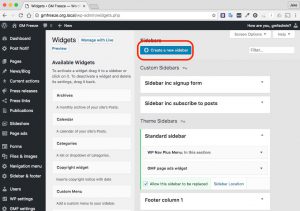 Which brings up this popup window:

Type a name, a description (optional) and click Create Sidebar
Then you may add widgets to your new sidebar and it will be available to choose when you change the sidebar on a page